Play Memory Match Online
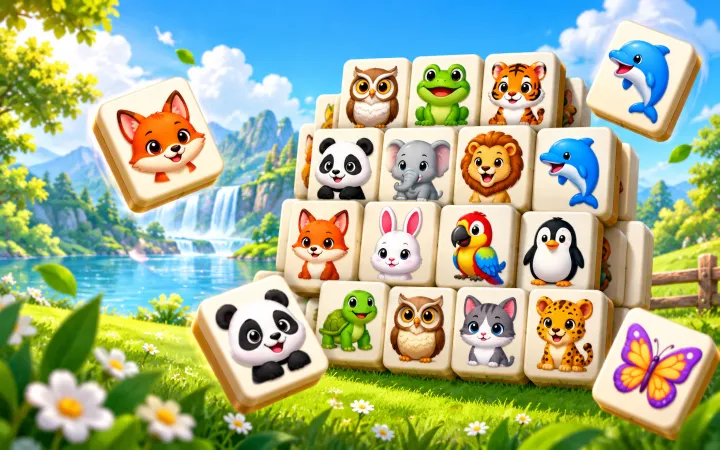
Memory Match is a free online memory matching game built around a simple challenge: turn over cards, remember where each animal appears, and find every identical pair. The board features twelve friendly animals, including a bear, fox, frog, koala, owl, panda, penguin, rabbit, monkey, lion, elephant, and squirrel. A new game shuffles their positions, so even a familiar difficulty gives you a fresh board to learn.
You can play immediately in a browser with no download or account. The compact controls and responsive board work on mobile and desktop, making the game easy to fit into a short break. Normal difficulty is selected first because it offers a balanced sixteen-card board, while Easy and Hard let you choose a quicker round or a larger memory challenge. Your moves, time, and best result remain visible without taking attention away from the cards.
How to Play Memory Match
Tap or click one face-down card to reveal an animal, then choose a second card. If both cards show the same animal, they stay face up and count as a completed pair. If the animals are different, you have a brief moment to look at them before both cards turn face down again. The round ends when every pair on the board has been found.
One move is counted each time you reveal a complete pair of cards, whether it matches or not. That makes a low move total the clearest measure of an accurate round. The timer begins with your first card, and it stops as soon as the final pair is complete. Your best result favors fewer moves; if two rounds use the same number of moves, the faster time wins. Restart returns the current difficulty to its opening layout, while New Game creates a newly shuffled board.
Choose Your Difficulty
Easy uses six animal pairs for twelve cards. Its three-column layout gives you enough room to practice remembering positions without making a round feel long. It is a good choice for a first game, a quick session, or anyone who prefers larger cards.
Normal uses eight pairs for sixteen cards in a four-by-four board. It adds enough possibilities to reward concentration while remaining comfortable on a phone. This is the default difficulty and the best place to learn how move count and match streaks work.
Hard includes all twelve animal pairs for twenty-four cards. More hidden positions make each mismatch more important, but the rules do not change. Each difficulty keeps its own best result, so playing Hard never replaces a strong Easy or Normal score.
Sound, Haptics, and Feedback
Light sound cues mark flips, matches, mismatches, and a completed board. Successful pairs have a small visual pop, and consecutive matches can build a Match Streak message. On supported devices, Haptics adds a very short vibration for a match and a brief celebration pattern when the round is complete.
Open Settings to turn Sound or Haptics off at any time. Both preferences are saved locally for your next visit. Browsers that do not support vibration simply ignore haptic feedback, and sound starts only after you interact with the game. Reduced-motion settings are also respected, shortening flips and removing decorative movement while keeping the board fully playable.
Tips to Improve Your Memory
Begin by scanning the board in a consistent direction instead of jumping randomly between cards. Moving from left to right or row by row gives every reveal a clear place in your mental map. When two cards do not match, try to name both animals and notice their positions before they turn back. A mismatch is useful information, not a wasted move, when it helps you complete a later pair.
Use known information as soon as it becomes available. If your first card matches an animal you remember seeing earlier, choose that remembered position rather than opening another unknown card. When neither card is familiar, reveal a new location and pay close attention. Short, focused rounds are often more productive than tapping quickly. Speed matters only after move count, so accurate choices are usually worth a brief pause.
Match streaks are satisfying, but they are best treated as feedback rather than a reason to rush. On larger boards, mentally divide the grid into small areas and finish obvious pairs before exploring too many new cards. Restart can help you replay the same arrangement and test what you retained; New Game is better when you want a completely fresh pattern.
Why Play Memory Matching Games?
A memory card game turns observation and pattern recall into a short, clear activity. Each turn asks you to notice an image, connect it with a location, and use that information later. The rules take only moments to understand, yet the changing shuffle keeps the task engaging across repeated rounds.
Memory matching games can help you practice attention and visual memory without complicated instructions or a long commitment. They also give each session a natural finish: clear the board, review your moves and time, then decide whether to try another difficulty or chase a better result. This game is casual entertainment and does not make medical or clinical claims.
Play on Mobile or Desktop
On a phone, the card grid fills the available width while leaving comfortable gaps between tap targets. Easy and Normal keep the main board prominent near the top of the page, and Hard fits all twenty-four cards without horizontal scrolling. The single-surface flip animation swaps the animal image while the card is edge-on, avoiding the double-sided card behavior that can be unreliable in some iPhone browsers.
Desktop players get the same rules in a centered board with a sensible maximum width, so cards stay easy to scan without becoming oversized. Keyboard users can move through the real button elements with Tab and reveal a card with Enter or Space. Whatever device you use, the game stores preferences and best scores only in the current browser.
Memory Match FAQ
Is Memory Match free to play?
Yes. Memory Match is free to play in your browser, with no download, registration, or purchase required.
How do you play Memory Match?
Turn over two cards at a time. Matching animals stay visible, while different animals turn face down again. Find every pair to finish the game.
Can I play Memory Match on my phone?
Yes. The board and controls are designed for current phone, tablet, and desktop browsers, including touch controls on iPhone and Android devices.
What is the best way to win a memory matching game?
Scan the board in a steady order and remember both cards whenever a pair does not match. Using known positions is more reliable than tapping randomly.
What difficulty should I start with?
Easy is a comfortable introduction with six pairs. Normal uses eight pairs and is the best starting point for most players, while Hard has twelve pairs.
Does Memory Match save my best score?
Yes. Your best result for each difficulty is saved locally in this browser. Fewer moves rank first, and a faster time breaks a tie in moves.
More Games
Try another free puzzle, matching game, or quick browser challenge on Uletime.