How to Play Sudoku
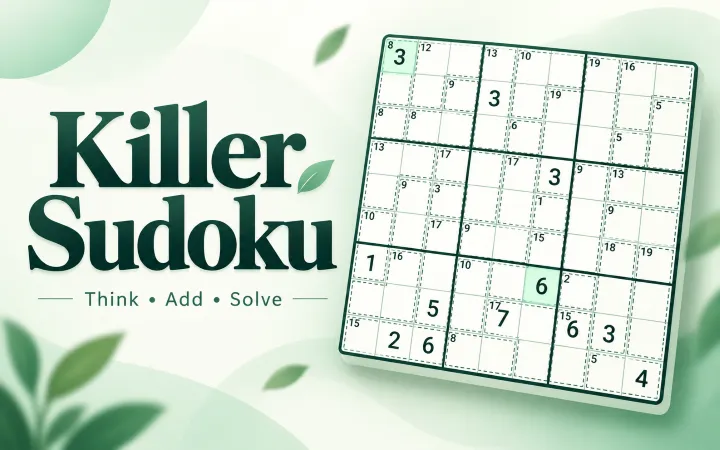
Sudoku is played on a grid of nine rows and nine columns, divided into nine smaller 3×3 boxes. Some cells already contain given numbers. Your task is to fill every remaining cell with a number from 1 to 9. Each number may appear only once in every row, once in every column, and once in every 3×3 box. Those three simple constraints create the entire puzzle; arithmetic is not needed.
Start by selecting an empty cell and checking the row, column, and box that meet there. Any number already present in one of those three areas cannot be used. If only one number remains possible, enter it with the on-screen number pad or a desktop number key. Given numbers stay fixed, while your entries can be erased, replaced, or restored with Undo.
A wrong answer remains visible instead of ending the game. The mistake counter increases for a new effective wrong entry, and the affected cell plus any direct row, column, or box conflicts are identified. Repeating the same unchanged wrong entry does not add another mistake. There is no forced mistake limit, so you can inspect the conflict and continue solving.
Sudoku Difficulty Levels
Easy
More direct placements and approachable scans for learning the three Sudoku constraints.
Medium
A balanced puzzle that asks you to track candidates across several rows and boxes.
Hard
Fewer obvious moves and longer chains of elimination for experienced solvers.
Expert
The most demanding set, designed for careful candidate work and patient cross-checking.
Uletime includes 40 puzzles: ten in each difficulty. The game uses a separate non-repeating rotation for every level, so all ten puzzles in a difficulty are offered before that set is shuffled again. Changing difficulty preserves the progress of the other rotations, and reloading the page does not silently generate a different puzzle.
Easy Sudoku emphasizes scanning; Medium Sudoku adds candidates; Hard Sudoku and Expert Sudoku require longer elimination chains.
Notes, Hints, and Fast Input
Notes are small candidate numbers that help record what may fit in an unfinished cell. Turn Notes on, select a cell, and tap a digit to add it; tap the same digit again to remove it. When a final number is entered, matching candidates are automatically removed from its row, column, and 3×3 box. This keeps routine cleanup out of the way without solving another cell for you.
Hint fills the correct answer in the selected editable cell. If the selection is unsuitable, it chooses the next unfinished cell in a stable order. Hints do not earn points, even when one completes a row, column, or box, and a game that uses a hint is not eligible for Best Time. Every hint is part of Undo history.
Fast input reverses the usual selection order. Choose a number first, then tap cells to place that number quickly. Cell input remains the familiar alternative: choose a cell, then a number. Both modes use the same Sudoku rules, scoring, notes cleanup, conflict checks, and completion detection.
Scoring and Best Time
A correct user-entered number earns 5 points. Completing a row, column, or 3×3 box adds 250 points, and one move can collect several of those bonuses at once. Each area is rewarded only once in the active state. Wrong answers and hint-filled values add no points. Undo restores the full earlier state, including score, mistakes, notes, completed areas, and hints used.
The timer counts active play only. Pause stops it and covers the board until you resume. Time spent while the page is hidden is also excluded, so changing tabs does not inflate the clock. A Best Time is recorded only after the complete board is correct and no hint was used. A solved game with mistakes can still qualify if you completed it without a hint.
Restart returns the current puzzle to its original givens. New Game draws the next puzzle from the selected difficulty. Your current game, Undo history, puzzle rotations, and Best Times are saved locally when browser storage is available; they are not tied to an online account or shared between devices.
Sudoku Tips for Beginners
- Scan rows, columns, and boxes with many givens before guessing.
- Look for a missing number that has only one legal cell in an area.
- Use Notes when two or three candidates remain instead of relying on memory.
- Recheck all three constraints before committing a final number.
- Compare the same digit across neighboring boxes to narrow its position.
- Use Undo to inspect a previous state without restarting the puzzle.
A useful first pass is to choose one digit and scan the whole board. If a box already contains that digit, skip it. In another box, existing copies in intersecting rows and columns may block every cell except one. This is often easier to see than examining each empty cell independently. Repeat the scan for several digits and update Notes as new placements remove candidates.
Avoid treating a candidate as an answer simply because it looks promising. A candidate means only that the number is not ruled out yet. When progress slows, inspect units with the fewest empty cells, then compare candidate pairs across a row, column, or box. Sudoku rewards accurate elimination more than speed, and Pause is available whenever you want to step away without affecting time.
Play Sudoku on Mobile or Desktop
The responsive board is designed for touch on phones and for mouse or keyboard input on larger screens. On desktop, use 1–9 to enter digits, N for Notes, H for Hint, U or Ctrl/Cmd+Z for Undo, Backspace or Delete to erase, arrow keys to move the selection, and P or Space to pause or resume. Keyboard shortcuts do not take over while you are typing in another page control.
Touch controls avoid text selection and browser zoom gestures inside the board while leaving normal page scrolling available. The state highlights follow a consistent order: errors and conflicts remain strongest, followed by the current cell, the same number, and related rows, columns, or boxes.
Why Play Sudoku on Uletime?
Uletime keeps the game focused: a readable white board, four difficulty levels, useful solving tools, and no installation or registration. Sound can be switched off, and reduced-motion preferences remove nonessential shake and stagger effects while keeping feedback and game rules clear.
The puzzle catalog is static rather than generated during play, making each puzzle identity stable for saving and rotation. Resume a session on the same browser, start a fresh puzzle when ready, or compare an eligible completion against the Best Time for that difficulty.
Frequently asked questions
Is Sudoku free, and do I need to download anything?
Uletime Sudoku is free to play in a supported web browser, with no account, download, installation, or purchase required.
How do you play Sudoku?
Fill every empty cell with a number from 1 to 9 so that each row, each column, and each 3×3 box contains every number exactly once.
What Sudoku difficulty levels are available?
You can choose Easy, Medium, Hard, or Expert. Each difficulty has its own set of puzzles and remembers its puzzle rotation separately.
How do Notes work in Sudoku?
Turn Notes on to add or remove small candidate numbers in empty cells. When a final number is placed, matching notes are cleared from its row, column, and box.
What does Hint do?
Hint fills the correct value in the selected editable cell, or the next unfinished cell when the selection is not suitable. Using a hint does not add score and makes that game ineligible for a Best Time.
Does Sudoku save my progress?
Yes, when browser storage is available. Your current puzzle, notes, score, mistakes, timer, Undo history, puzzle rotation, and eligible Best Times are stored locally on that device.
Can I play Sudoku on mobile?
Yes. The board, tools, and number pad are designed for touch on current mobile browsers and also support mouse and keyboard play on desktop.
Do mistakes end the game?
No. An incorrect entry remains on the board until you erase, replace, or undo it, and there is no forced failure limit in this version.
More Games
Try another thoughtful browser game with a different kind of planning, from card sequences to tile paths and layered matches.