
How to Play 2048 3D: Controls, Rules, and Cube Navigation
Learn to play Uletime's 2048 3D with six movement directions, a rotating cube, and two board sizes.
Play 2048 3DClassic 2048 is played on a flat grid: you slide numbered tiles, combine matching values, and try to build a 2048 tile. 2048 3D keeps the familiar merging idea but adds a third dimension. Numbers occupy positions within a cube, and every move can affect an entire stack of tiles—not just one row on a screen.
The key to learning the game is to separate moving the numbered cubes from changing your viewing angle. Once that distinction clicks, the controls become much easier to understand.
Start with the 3×3×3 cube
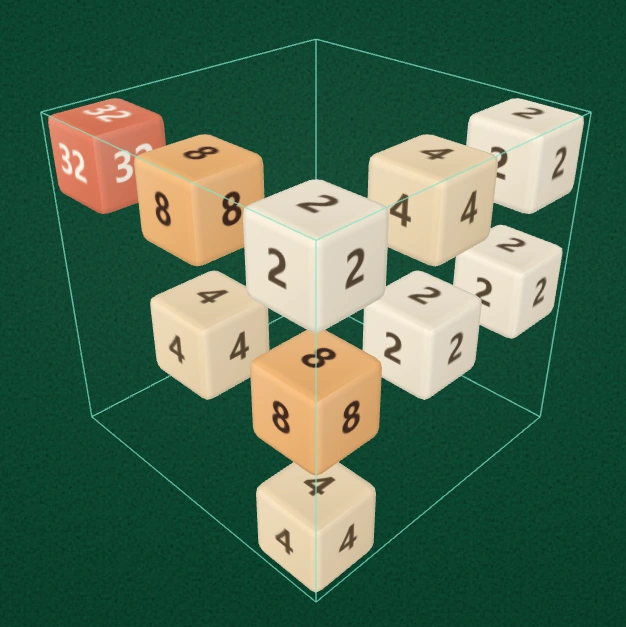
The 3×3×3 mode has 27 possible positions. The gaps between blocks help reveal cubes that sit deeper inside the board.
Choose 3×3×3 to learn the controls. This mode provides three positions along each axis, for a total of 27 positions. You can later switch to 4×4×4, which has 64 positions and more room for combinations—but also more numbers to track.
The thin outer wireframe marks the board boundary. Some positions are empty; the visible numbered blocks are the tiles currently in play. The empty spaces matter because they let rows and columns slide.
What happens when you make a move?
A valid move pushes every numbered block as far as it can travel along the chosen axis, stopping at the boundary or another block. When two blocks of the same value meet in that movement line, they combine into one block worth twice as much: 2 + 2 = 4, 4 + 4 = 8, and so on.
You earn the merged value as points. A block can merge only once during a single move; a line with four 2s can become two 4s, but not immediately an 8 on the same turn. After a move that changes the board, a new numbered block appears. If a move changes nothing, it does not create a new block.
Unlike the flat game, there are three axes, each with two directions. That gives you six possible moves. Thinking in axes is more useful than trying to remember a fixed left/right/up/down rule.
Control the board with six direction buttons
The controller shows six arrow buttons arranged in two rows: ↖ ↑ ↗ and ↙ ↓ ↘. The diagonal arrows correspond to the two visible diagonal axes of the projected cube. The vertical pair handles the remaining axis.
- Tap an arrow to slide blocks along the direction shown on screen.
- Swipe along a visible cube axis with a mouse or finger to make the same kind of move. The gesture is interpreted from the current viewing angle.
- Release the drag to confirm the move. If the swipe is too short or ambiguous, try a clearer, longer movement along the intended line.
You do not need to memorize the labels X, Y, and Z. Watch the direction of the cube's structure lines and the arrow you are using. Try each pair of opposite directions once, without worrying about score, to build a feel for how stacks shift.
Rotate to see—don't drag to rotate
Uletime's 2048 3D deliberately separates camera movement from tile movement. Dragging over the board is reserved for gameplay, not free camera rotation.
Use Left or Right to turn the viewing angle horizontally by 90°. The cube's orientation on your screen changes, and the six-arrow controller continues to follow the visible directions. The underlying board and its numbers do not rotate in game logic; only your viewpoint changes.
Use Inspect when blocks hide one another. Inspect switches to an observation angle and temporarily locks movement so that looking around cannot cause an accidental turn. Return to Play to continue merging. Fit returns the view to a comfortable framing.
The Spacing control changes the distances between cubes, not the size of the cubes themselves. Increasing the spacing can make interior numbers easier to read, especially later in the game. It does not change the puzzle's 27 or 64 positions.
Follow a simple opening routine
- Start in 3×3×3 and identify a pair of matching values on the same three-position line.
- Make one deliberate move along that line, then check where all other blocks ended up.
- Use the opposite direction only when it creates a better grouping or frees space.
- Rotate the view when the arrangement becomes difficult to read; do not guess based on a hidden number.
- Keep at least one open movement line whenever possible. A cube packed with mismatched values can be difficult to recover.
Use Undo when you need to revisit a decision, and Restart to begin a new run. Score, Best, and Time help you compare attempts, but learning to recognize three-dimensional lines matters more than speed at first.
Common beginner mistakes
Confusing camera rotation with a game move. Left and Right change your viewpoint; the six directional arrows move numbers. Rotating the view does not itself merge tiles.
Treating every visible diagonal as the same line. Two cubes may look adjacent in the picture but occupy different depth layers. Rotate or inspect before committing.
Overusing one direction. Repeatedly pushing the same way often compresses the board without creating useful matches. Look for complementary moves across the third axis.
Making the cube too compact. If blocks cover one another, increase Spacing temporarily rather than moving blindly.
Frequently asked questions
Is 2048 3D the same as normal 2048?
The doubling rule is similar, but movement takes place along three spatial axes rather than two. You need to track depth as well as horizontal and vertical position.
Can I play with a touchscreen?
Yes. Swipe along one of the projected cube axes or use the six on-screen arrow buttons. The controls are designed for both mouse and touch input.
Should I begin with 3×3×3 or 4×4×4?
Begin with 3×3×3 to learn the spatial controls. Once the directions feel natural, try 4×4×4 for a larger puzzle. See our 3×3×3 vs 4×4×4 comparison.
Ready to experiment? Play 2048 3D on Uletime and try combining the same pair from different viewing angles.