
2048 3D Strategy: How to Merge Numbers in Three Dimensions
Practical ways to plan six-direction moves, protect open space, and build larger numbers in a 3D 2048 cube.
Play 2048 3DA strong move in 2048 3D is not simply one that merges two matching numbers. It is one that improves the next few moves while keeping the board readable. The third dimension makes this harder to judge than in classic 2048: a promising pair may sit on a different depth line, and a harmless-looking slide can change several stacks at once.
There is no guaranteed shortcut to a high score. These principles can, however, help you avoid preventable mistakes.
1. Think in lines, not isolated cubes
Every movement pushes blocks along parallel lines through the 3D grid. On a 3×3×3 board, the chosen axis contains nine independent three-position lines. A move can compact or merge blocks in several of those lines simultaneously.
Before committing, inspect two things: which equal values already share a movement line, and where the surviving blocks will end up. Matching values that look close together in a projected image may not be aligned in 3D.
Consider a single line ordered toward the direction of travel:
| Before | After the move |
|---|---|
| 2 · 2 · empty | 4 · empty · empty |
| 2 · 2 · 2 | 4 · 2 · empty |
| 4 · 4 · 8 | 8 · 8 · empty |
These examples describe one line only. All other parallel lines move at the same time, so the overall result may be more complicated.
2. Give your highest block a stable home
In flat 2048, a common tactic is to protect a high-value tile near a corner. In 3D, the equivalent is a stable corner position of the cube, but it takes more discipline: six possible directions mean more ways to dislodge your largest value.
Try to keep large numbers grouped near one corner and bring smaller matching values toward them. Avoid blindly reversing direction across the entire cube just to gain an easy 4 or 8. A small merge is not always worth disrupting a carefully arranged high-value group.
Treat the corner rule as a useful heuristic, not an absolute law. Sometimes moving the largest block is necessary to escape a congested position.
3. Preserve useful empty space
An empty cell is more than unused capacity. It gives nearby numbers room to move, which can open paths for future merges. This matters especially in 3×3×3, where only 27 positions are available.
After each move, ask: did I create a merge while maintaining flexibility, or did I push several unrelated values into a tight cluster? When a cube begins to fill, prioritize moves that combine tiles without trapping incompatible numbers across neighboring lines.
Avoid relying on a single open-looking face. A board can appear spacious from one angle while another depth layer is nearly full.
4. Use the third axis to create combinations
The extra axis is the feature that makes this version strategically different. If two matching blocks are on separate horizontal or vertical lines, consider whether a move along the depth axis can align them for a later merge.
Think in two-move sequences instead of one-move rewards:
- Use one axis to bring matching values onto a shared line.
- Use a second axis to merge them.
- Check what the move does to larger blocks before committing.
The correct sequence depends on other cubes in the way. One depth move may improve a pairing but worsen another, so always evaluate the whole board.
5. Change your viewpoint before a risky move
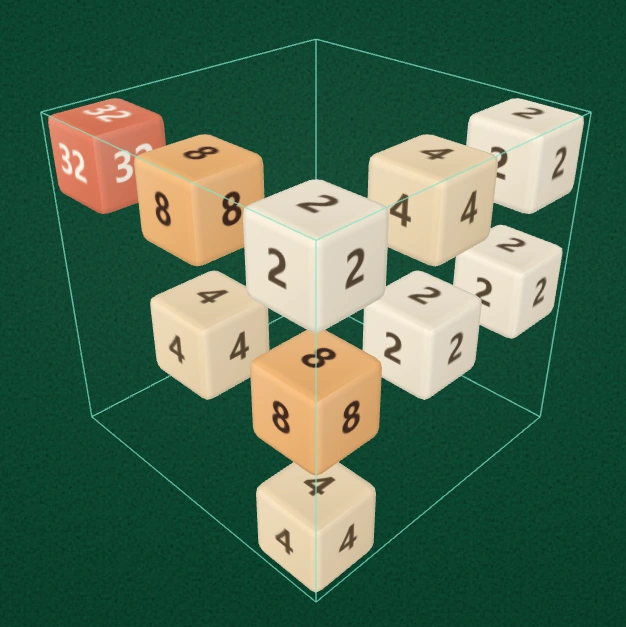
Spacing and viewpoint changes can reveal numbers at different depths. The screenshot illustrates the spatial board, not a guaranteed move sequence.
A bad move can come from a bad read rather than a bad plan. Because blocks may overlap in perspective, use the camera tools as part of your decision-making:
- Tap Left or Right to turn the cube horizontally in 90° steps.
- Open Inspect to check a difficult arrangement without accidentally sliding cubes.
- Increase Spacing when the interior is hard to see. The blocks stay the same size; only their separation changes.
- Return to Play before executing your intended move.
These actions do not change the board state, so there is no strategy penalty for taking a better look.
6. Avoid automatic back-and-forth moves
In ordinary 2048, repeating two opposite directions sometimes appears to simplify the board. In 3D, the same habit can quickly fill important lines with mismatched values. An ineffective move also produces no merge benefit.
Instead, set a purpose for each slide: combine an existing pair, align a future pair, or make room around an important cluster. If you cannot explain what the move is intended to accomplish, take another look before using it.
7. Adjust your strategy for the board size
3×3×3 rewards careful space management. Small mistakes become visible quickly, because every line has only three positions. Use it to learn how movements on one axis affect the others.
4×4×4 offers 64 positions and four cells per line. That provides more potential combinations, but the larger volume also makes it easier to lose track of distant numbers. Periodically rotate the viewing angle and avoid spreading high-value tiles across too many unrelated lines.
Neither mode is automatically easier in every situation: a bigger board gives more room, but also increases planning and visual complexity. Read the full 3×3×3 vs 4×4×4 guide for a practical comparison.
Frequently asked questions
What is the best first move in 2048 3D?
There is no universal first move because the initial board varies. Look for matching numbers that already share an axis-aligned line, and prefer an opening that leaves additional space.
Should I always keep the biggest number in a corner?
It is often a useful strategy, but not a requirement. Do not sacrifice multiple merging opportunities merely to preserve a corner at all costs.
Does rotating the cube move the numbers?
No. Turning the viewpoint changes only what you can see. A slide or arrow-button action is what changes the board.
Put the ideas into practice: Play 2048 3D and compare how the same board looks after turning the camera one quarter turn.